# Azure DevOps Integration
> Source: https://docs.synthesized.io/tdk/latest/user_guide/070_integrations/cicd/azure_devops
> For the complete documentation index, see [llms.txt](https://docs.synthesized.io/llms.txt).
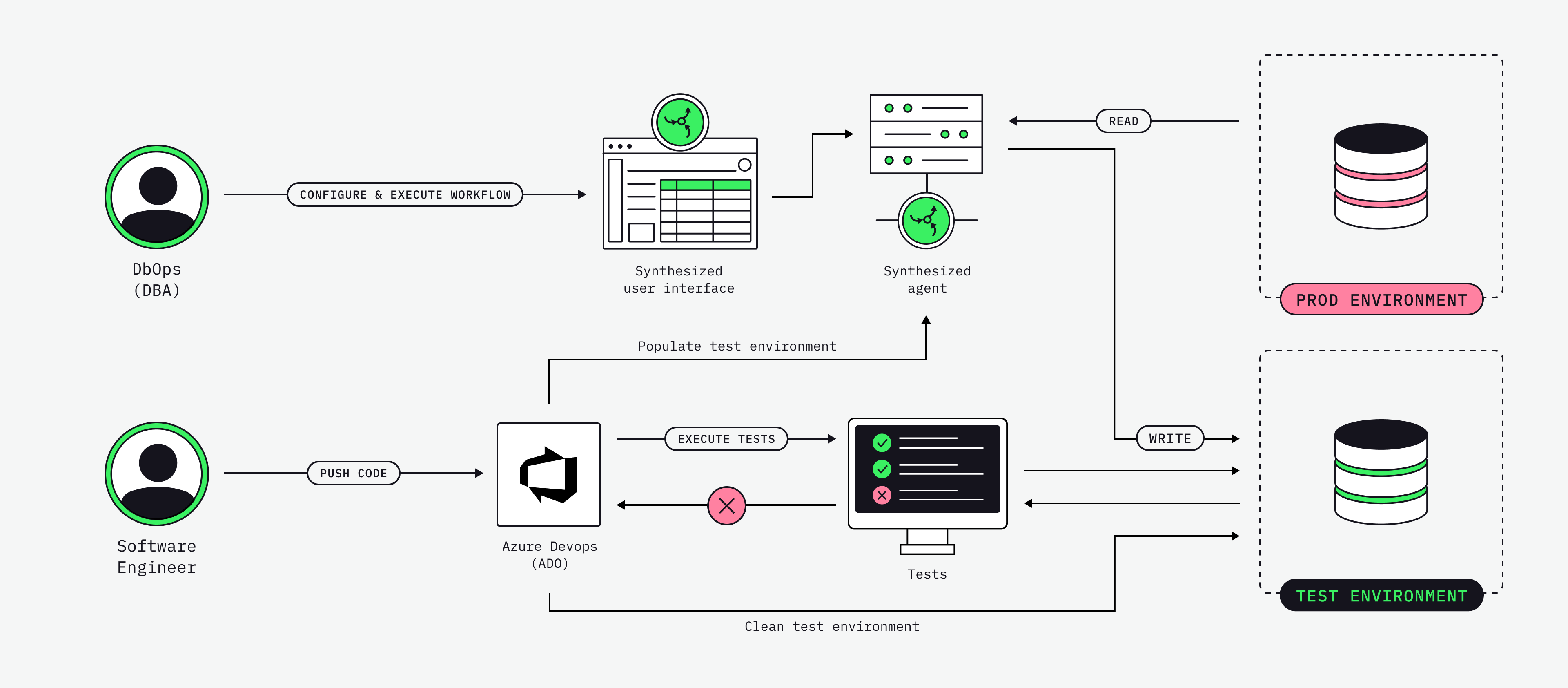
Run Synthesized workflows from an Azure DevOps pipeline: mask production data, generate synthetic edge cases, then run your test suite — all as pipeline stages.
## What this does
The pipeline triggers workflows you have already built in Governor. The worked example is the QA test-data flow, in three steps:
1. **Mask** a subset of production data into the test database.
2. **Generate** synthetic edge cases (nulls, boundary values, rare combinations) that production data rarely covers.
3. **Run** the QA suite against the freshly loaded test database.
Everything is triggered from Azure DevOps — no one logs into a database tool and no one copies a CSV by hand. Add a schedule and QA walks in each morning to a fresh test database.
## How it works
The pipeline calls Governor’s external REST API. Each workflow step:
1. Authenticates with an access key in the `X-Access-Key` header.
2. Submits a run (`POST /workflow/{id}/run`).
3. Polls the run until it reaches a terminal status.
4. Tails the run logs if it fails.
The only custom code is one shell script (`run-synthesized-workflow.sh`) that does the submit-and-poll. The workflows themselves — masking rules, generation rules, source and target connections — live in Governor and are managed from the Governor UI.
## Prerequisites
- **Two workflows defined in Governor.** Build each one in the Governor UI, run it once to confirm it completes, and note its numeric **workflow ID** (visible in the URL, e.g. `/workflow/42`). The example uses:
mask-prod-to-test
Source = production (read-only), target = test DB, masking rules for every PII column.
generate-synthetic
Target = test DB, synthetic generation rules for the edge cases your tests need.
- **An access key.** In the Governor UI: **Admin → Access Keys → Generate new key**. The value looks like `:` and is shown only once.
- **A variable group** named `synthesized-tdk` in Azure DevOps (see [Secrets](#Secrets)).
## REST endpoints
All paths are under `${GOVERNOR_BASE_URL}/external/api/v1` and use the `X-Access-Key: ` header.
| Purpose | Method and path |
| --- | --- |
|
Health check
|
`GET /healthy`
|
|
Run a workflow
|
`POST /workflow/{id}/run?useWorkers=true`
|
|
Get run status
|
`GET /workflow-run/{id}`
|
|
Get run logs
|
`GET /workflow-run/{id}/logs?skip=0&limit=200`
|
|
Stop a workflow
|
`POST /workflow/{id}/stop`
|
Run statuses: `COMPLETED`, `FAILED`, `STOPPED` are terminal; `QUEUED`, `RUNNING`, `STOPPING` are in-flight.
> **NOTE**
> `POST /workflow/{id}/stop` takes the **workflow** ID, not the run ID — it stops that workflow’s current run.
## The pipeline
Two stages: prepare the test data (two workflows), then run the QA suite. The schedule refreshes the data every weekday morning, and the `skipMasking` / `skipGeneration` parameters let you re-run just part of the flow.
```yaml
# azure-pipelines.yml
trigger: none # run on demand
schedules:
# Refresh test data every weekday at 05:00 UTC.
- cron: "0 5 * * 1-5"
displayName: Nightly test-data refresh
branches:
include: [main]
always: true # run even with no source changes
parameters:
- name: skipMasking
displayName: Skip masking step (use existing test data)
type: boolean
default: false
- name: skipGeneration
displayName: Skip synthetic generation step
type: boolean
default: false
variables:
- group: synthesized-tdk # GOVERNOR_BASE_URL, X_ACCESS_KEY, workflow IDs
pool:
vmImage: ubuntu-latest
stages:
# -------- STAGE 1 — Prepare test data --------
- stage: PrepareTestData
displayName: "1. Prepare test data"
jobs:
- job: Preflight
displayName: "Preflight: Governor reachable"
steps:
- bash: |
set -euo pipefail
which jq >/dev/null || sudo apt-get install -y jq
curl -sS -f -H "X-Access-Key: ${X_ACCESS_KEY}" \
"${GOVERNOR_BASE_URL%/}/external/api/v1/healthy"
echo; echo "Governor is healthy."
displayName: "Health check"
env:
GOVERNOR_BASE_URL: $(GOVERNOR_BASE_URL)
X_ACCESS_KEY: $(X_ACCESS_KEY)
- job: MaskProdToTest
displayName: "Mask prod → test DB"
dependsOn: Preflight
condition: and(succeeded(), eq('${{ parameters.skipMasking }}', 'false'))
steps:
- template: templates/run-workflow-step.yml
parameters:
stepName: runMask
displayName: "Run masking workflow"
workflowId: $(MASK_WORKFLOW_ID)
runLabel: "mask-prod-to-test"
timeoutSec: "2400" # 40 min — prod extract can be slow
- job: GenerateSynthetic
displayName: "Generate synthetic edge cases → test DB"
dependsOn: MaskProdToTest
condition: and(succeeded(), eq('${{ parameters.skipGeneration }}', 'false'))
steps:
- template: templates/run-workflow-step.yml
parameters:
stepName: runGenerate
displayName: "Run generation workflow"
workflowId: $(GENERATE_WORKFLOW_ID)
runLabel: "generate-synthetic"
timeoutSec: "1800"
# -------- STAGE 2 — Run QA tests --------
- stage: RunQATests
displayName: "2. Run QA tests"
dependsOn: PrepareTestData
condition: succeeded()
jobs:
- job: IntegrationTests
displayName: "Integration + regression suite"
steps:
- bash: |
set -euo pipefail
# Replace with your test runner, e.g.:
# mvn -B verify -Dspring.profiles.active=ci
# ./gradlew integrationTest
# pytest -q tests/integration
echo "Run your test suite here."
displayName: "Run tests"
- task: PublishTestResults@2
condition: succeededOrFailed()
displayName: "Publish test results"
inputs:
testRunner: JUnit
testResultsFiles: "**/TEST-*.xml"
failTaskOnFailedTests: true
```
To run it per pull request instead of nightly, replace `trigger: none` with `pr: [main]` — nothing else changes. See [In the Azure DevOps UI](#ado-ui) for how these stages and parameters appear when you run it.
## Reusable step template
The submit-and-poll logic is wrapped in a step template, so running any workflow from any pipeline is a single `template:` reference. It passes the workflow ID and tuning values to the poller script as environment variables.
```yaml
# templates/run-workflow-step.yml
parameters:
- name: stepName
type: string
- name: displayName
type: string
- name: workflowId
type: string
- name: runLabel
type: string
default: ''
- name: useWorkers
type: string
default: 'true'
- name: timeoutSec
type: string
default: '1800'
- name: pollIntervalSec
type: string
default: '10'
steps:
- task: Bash@3
name: ${{ parameters.stepName }}
displayName: ${{ parameters.displayName }}
env:
GOVERNOR_BASE_URL: $(GOVERNOR_BASE_URL)
X_ACCESS_KEY: $(X_ACCESS_KEY) # secret variable — masked in logs
WORKFLOW_ID: ${{ parameters.workflowId }}
USE_WORKERS: ${{ parameters.useWorkers }}
TIMEOUT_SEC: ${{ parameters.timeoutSec }}
POLL_INTERVAL_SEC: ${{ parameters.pollIntervalSec }}
RUN_LABEL: ${{ parameters.runLabel }}
inputs:
targetType: inline
script: |
bash "$(System.DefaultWorkingDirectory)/scripts/run-synthesized-workflow.sh"
```
## The poller script
This is the only custom code. It submits a run, polls until the run reaches a terminal status, exposes the run ID to later steps, and tails the logs on failure. On timeout it tries to stop the workflow before failing the step.
```bash
#!/usr/bin/env bash
#
# run-synthesized-workflow.sh
# Triggers a Synthesized workflow via Governor's REST API and polls to completion.
#
# Required: GOVERNOR_BASE_URL, X_ACCESS_KEY, WORKFLOW_ID
# Optional: USE_WORKERS (true), POLL_INTERVAL_SEC (10), TIMEOUT_SEC (1800), RUN_LABEL
# Exit: 0 = COMPLETED, 1 = FAILED | STOPPED | timeout | API error
#
set -euo pipefail
: "${GOVERNOR_BASE_URL:?GOVERNOR_BASE_URL is required}"
: "${X_ACCESS_KEY:?X_ACCESS_KEY is required}"
: "${WORKFLOW_ID:?WORKFLOW_ID is required}"
USE_WORKERS="${USE_WORKERS:-true}"
POLL_INTERVAL_SEC="${POLL_INTERVAL_SEC:-10}"
TIMEOUT_SEC="${TIMEOUT_SEC:-1800}"
RUN_LABEL="${RUN_LABEL:-workflow-${WORKFLOW_ID}}"
BASE="${GOVERNOR_BASE_URL%/}/external/api/v1"
log() { echo "[$(date -u +%H:%M:%S)] $*"; }
err() { echo "##[error]$*"; }
# 1. Preflight
health_code=$(curl -sS -o /tmp/health.out -w "%{http_code}" \
-H "X-Access-Key: ${X_ACCESS_KEY}" "${BASE}/healthy" || true)
if [[ "${health_code}" != "200" ]]; then
err "Governor health check failed: HTTP ${health_code}"; cat /tmp/health.out || true; exit 1
fi
log "Health check OK"
# 2. Submit run
submit_url="${BASE}/workflow/${WORKFLOW_ID}/run?useWorkers=${USE_WORKERS}"
log "POST ${submit_url}"
submit_code=$(curl -sS -o /tmp/submit.json -w "%{http_code}" -X POST \
-H "X-Access-Key: ${X_ACCESS_KEY}" -H "Accept: application/json" "${submit_url}" || true)
if [[ "${submit_code}" != "200" ]]; then
err "Workflow submit failed: HTTP ${submit_code}"; cat /tmp/submit.json || true; exit 1
fi
run_id=$(jq -r '.workflow_run_id' /tmp/submit.json)
if [[ -z "${run_id}" || "${run_id}" == "null" ]]; then
err "Could not parse workflow_run_id:"; cat /tmp/submit.json; exit 1
fi
log "Submitted. workflow_run_id=${run_id}"
echo "##vso[task.setvariable variable=synthesizedRunId;isOutput=true]${run_id}"
# 3. Poll
deadline=$(( $(date +%s) + TIMEOUT_SEC ))
last_status=""
while :; do
if (( $(date +%s) > deadline )); then
err "Timed out after ${TIMEOUT_SEC}s waiting for run ${run_id}"; break
fi
status_code=$(curl -sS -o /tmp/status.json -w "%{http_code}" \
-H "X-Access-Key: ${X_ACCESS_KEY}" "${BASE}/workflow-run/${run_id}" || true)
if [[ "${status_code}" != "200" ]]; then
log "Transient poll error: HTTP ${status_code}. Retrying..."; sleep "${POLL_INTERVAL_SEC}"; continue
fi
status=$(jq -r '.workflow_run_status' /tmp/status.json)
if [[ "${status}" != "${last_status}" ]]; then log "Status: ${status}"; last_status="${status}"; fi
case "${status}" in
COMPLETED)
log "Run ${run_id} completed successfully"; exit 0 ;;
FAILED|STOPPED)
err "Run ${run_id} ended with status ${status}"
jq -r '.error_message // "(no error_message)"' /tmp/status.json
curl -sS -H "X-Access-Key: ${X_ACCESS_KEY}" \
"${BASE}/workflow-run/${run_id}/logs?skip=0&limit=200" || true
exit 1 ;;
QUEUED|RUNNING|STOPPING)
sleep "${POLL_INTERVAL_SEC}" ;;
*)
log "Unknown status '${status}', continuing to poll"; sleep "${POLL_INTERVAL_SEC}" ;;
esac
done
# Timeout: stop the running workflow and fail the step.
curl -sS -o /dev/null -X POST \
-H "X-Access-Key: ${X_ACCESS_KEY}" "${BASE}/workflow/${WORKFLOW_ID}/stop" || true
exit 1
```
## Secrets
Create a variable group so secrets are injected by Azure DevOps and never live in the YAML. Go to **Pipelines → Library → + Variable group**, name it `synthesized-tdk`, and add:
| Name | Value | Secret? |
| --- | --- | --- |
|
`GOVERNOR_BASE_URL`
|
e.g. `[https://tdk.](https://tdk.\);`
|
no
|
|
`X_ACCESS_KEY`
|
the access key from Governor
|
**yes**
|
|
`MASK_WORKFLOW_ID`
|
workflow ID for the masking flow
|
no
|
|
`GENERATE_WORKFLOW_ID`
|
workflow ID for the generation flow
|
no
|
Marking `X_ACCESS_KEY` as secret ensures Azure DevOps masks it in pipeline logs.
> **TIP**
> Governor access keys are scoped. Create a key that can only run workflows tagged for QA, so the pipeline can never trigger a production-touching workflow.
## Setup checklist
1. Build and run the two workflows once in Governor; note their IDs.
2. Generate an access key (**Admin → Access Keys**).
3. Create the `synthesized-tdk` variable group with the values above.
4. Push the repo (`azure-pipelines.yml`, `templates/`, `scripts/`) to Azure Repos.
5. **Pipelines → New pipeline → Existing YAML** and point it at `/azure-pipelines.yml`.
6. Run it once from the **Run pipeline** dialog, both skip options unchecked.
> **NOTE**
> Microsoft-hosted agents need the free-tier parallelism grant approved for your organization. Request it early — approval can take a few business days.
## In the Azure DevOps UI
Once the variable group and pipeline exist, the whole flow runs from the Azure DevOps UI — no command line. Everything you see here comes straight from the YAML; this section maps one to the other.
### Create the pipeline
**Pipelines → New pipeline → Azure Repos Git**, pick the repository, choose **Existing Azure Pipelines YAML file**, and point it at `/azure-pipelines.yml`. Azure DevOps reads the file and shows the pipeline; **Save** it.
### Run it
Open the pipeline and click **Run pipeline**. The boolean `parameters` from the YAML render as checkboxes in the dialog — **Skip masking step (use existing test data)** and **Skip synthetic generation step**. For a full run, leave both unchecked, select the `main` branch, and click **Run**.
### Watch the run
The run page shows the two `stages` from the YAML as a graph: **1\. Prepare test data** and **2\. Run QA tests**. Stage 1 expands into its jobs — **Preflight**, **Mask prod → test DB**, and **Generate synthetic edge cases** — each matching a `job` in the YAML and using its `displayName`. Click any job to stream its logs live.
In the masking job’s log you’ll see the health check, the `POST`, and the printed `workflow_run_id`, then `Status: RUNNING` advancing to `Status: COMPLETED` as the poller polls Governor.
Those log lines are the poller script running on the build agent, not in the browser — clicking **Run pipeline** queues the pipeline, the agent runs the `Bash@3` step that calls `run-synthesized-workflow.sh`, and the UI streams its output. The script’s exit code is what turns the job green or red.
### Correlate with Governor
Open the workflow’s run history in the Governor UI and find the run with the same ID the job printed. The pipeline isn’t doing anything magic — it’s just driving Governor’s REST API, and every run is visible and audited in Governor.
### Re-run part of the flow
To reuse data that’s already masked, click **Run pipeline** again and tick **Skip masking step**. The masking job’s `condition` evaluates that parameter, the job is marked **Skipped** in the graph, and the run goes straight to generation and the QA tests.
> **NOTE**
> The `schedules` block means none of this needs a human: at 05:00 UTC on weekdays Azure DevOps queues the same run automatically, so QA finds a fresh test database each morning.
## Troubleshooting
A run failed — where do I look?
The script prints the run’s `error_message` and tails the last 200 log lines on failure. The `workflow_run_id` is logged on submission and set as the `synthesizedRunId` output variable, so you can match the pipeline run to the run in the Governor UI.
A workflow takes longer than the timeout.
Increase `timeoutSec` on the step (it maps to `TIMEOUT_SEC` in the script).
The pipeline hangs while polling.
Cancel it in Azure DevOps and re-run with `skipMasking=true` (or `skipGeneration=true`) to skip the slow stage. On timeout the script also attempts to stop the running workflow.
How do I stop a pipeline running a production-touching workflow?
Scope the Governor access key so it can only run workflows tagged for QA, and lock the variable group to the appropriate environment.
## See also
- [CI/CD Integrations](https://docs.synthesized.io/tdk/latest/user_guide/070_integrations/cicd/)
- [GitHub Actions Integration](https://docs.synthesized.io/tdk/latest/user_guide/070_integrations/cicd/github_actions)
- [Public API Reference](https://docs.synthesized.io/tdk/latest/user_guide/020_guides/advanced_workflows/external_api_reference)