Synthesized Workers
What are Synthesized Workers and why should we use them?
The Synthesized platform serves as the core of database processing within Governor. This system interfaces with both input and output databases, executing essential operations for data generation, masking, and subsetting. A TDK Worker is a piece of software that encompasses the processing engine and can connect to a Governor instance over the Internet. Therefore, the machine hosting the Worker must have access to both the transformed database and Governor. Workers visible in Governor can be managed through the Governor UI.
The use of Workers is warranted for the following reasons:
Performance and Horizontal Scaling
The platform processes all the transformed or generated data. To ensure optimal performance, a platform instance should be positioned as close to the database as possible, ideally by residing on the same machine or at least within the same local network. This minimizes SQL query latency and overall execution time.
For executing multiple workflows on several databases simultaneously, it is advisable to employ multiple Worker instances.
Security
There are practical and security reasons for installing the platform in the same network or on the same machine as the database server. It may not always be feasible or safe to allow a remote host Internet access to a database containing sensitive data.
| Synthesized Workers do not transmit any database-contained data to Governor, ensuring that all the sensitive information remains within the Worker and is not passed over the Internet. |
Setting up the system
Setting up Governor
Workers are enabled in Governor by default. To change the available gRPC port on the backend container, set the WORKER_GRPC_PORT environment variable for the Governor API container (by default, the port is set to 50055).
For backward compatibility, AGENT_* environment variables are still supported and automatically remapped to WORKER_* at startup. If both are set, WORKER_* takes precedence.
|
Setting up the worker
To deploy a worker locally, use the following Docker command:
docker run \
  -e WORKER_SERVERHOST=[server host] \ (1)
  -e WORKER_SERVERPORT=[server port] \ (2)
  -e WORKER_TAGS=[tags] \ (3)
  -e WORKER_DATASOURCES=[tags] (4)
synthesizedio/synthesized-worker-
Server host is the Governor gRPC host.
-
Server port is the gRPC port on Governor. The standard SSL port is 443, however, if you set up Governor on a local network without SSL and connect to Governor directly, the port is typically 50055.
-
Worker tags is the list of tags used to identify the workers.
-
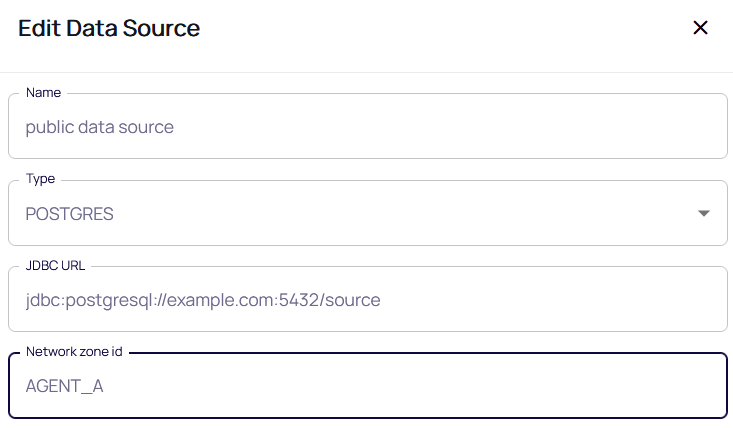
Data source tags is the list of network zone ids used to identify data sources located nearby the current worker. In Governor, a datasource must have the same network zone id in order for a workflow to be selected for execution on the worker.
Use a plain comma-separated format for listing tags, e.g. tag1,tag2.
|
Running a workflow with a Worker
-
The Workers section in Governor displays a list of connected workers, their statuses, and tags:

-
Assign the appropriate network zone ID for the available data sources. For a worker to pick up a task, at least one of its data source tags must match the network zone ID of the respective data source.
-
Workflows run on a connected worker automatically whenever the data source’s network zone ID matches one of the worker’s data source tags. There is no per-workflow toggle to enable or disable worker execution.