Multi-Worker Deployment
Running multiple Governor workers in parallel allows concurrent workflow execution. Each worker independently polls for queued tasks over gRPC and processes them in parallel, increasing throughput for environments with many simultaneous workflows.
Docker Compose
Scaling Workers
The base docker-compose.yml defines a single worker service.
Use the docker-compose.multi-worker.yml overlay with --scale to run multiple
identical workers in parallel:
docker compose \
  -f docker-compose.yml \
  -f docker-compose.override.yml \
  -f docker-compose.multi-worker.yml \
  up --scale worker=3 --detach
The overlay resets the static host port binding on the worker service.
Without it, --scale would fail because all replicas attempt to bind port 8083
on the host simultaneously. Port 8083 remains accessible within the Docker network.
On first start, the overlay also provisions the following automatically for the demo stack:
| What | How |
|---|---|
Second output database ( |
Created via |
Second output connection in Governor |
Seeded via |
Masking workflow pre-wired to second output |
Same seed file updates the workflow’s output connection assignment (release demo stack only) |
|
The |
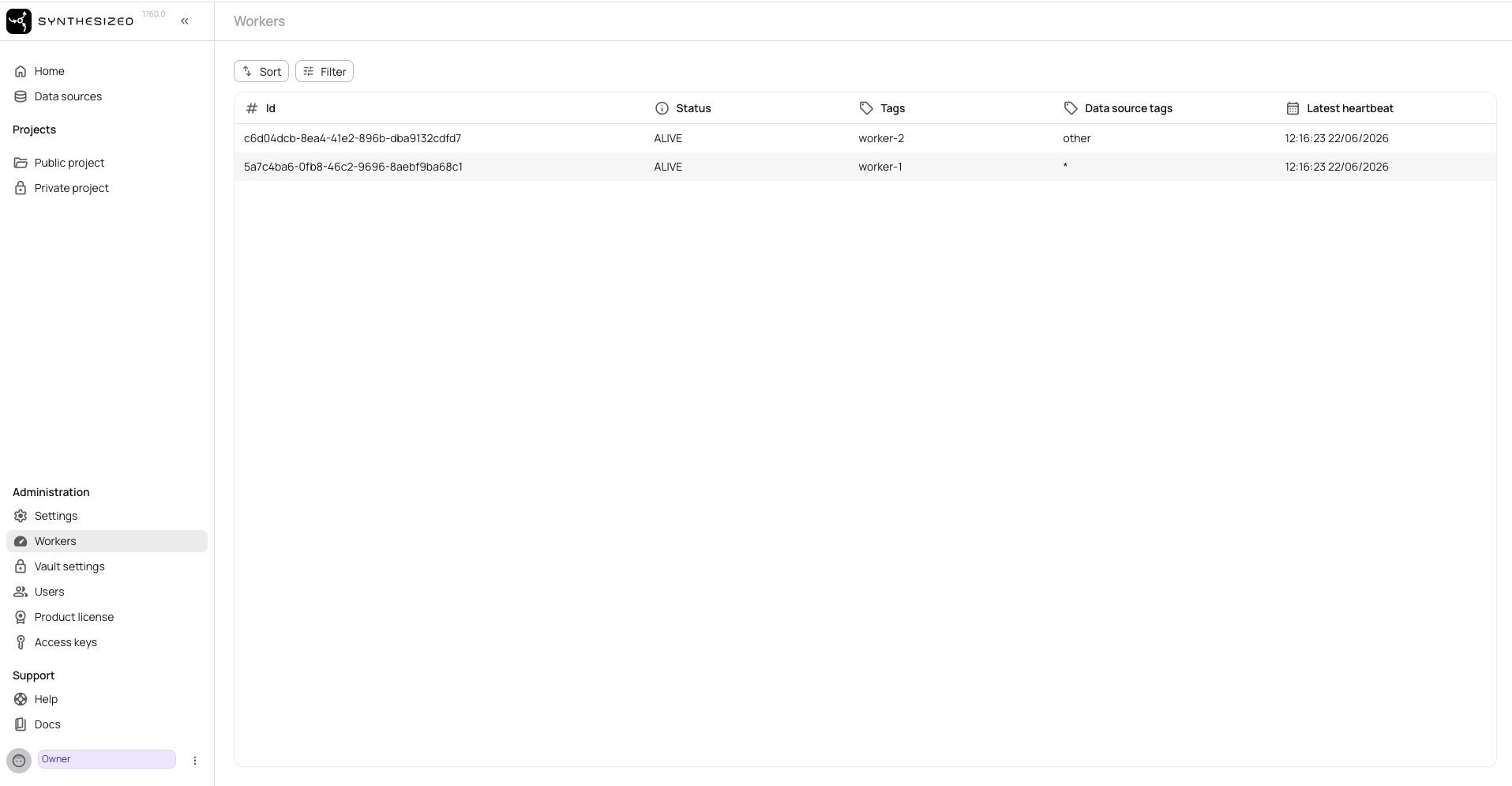
Once the stack is running, all workers register in the Governor UI under Workers.
The Data source tags column shows which datasource group each worker is assigned to —
* means the worker handles any group:
Datasource Assignment
All replicas started with --scale share the same AGENT_DATASOURCES and AGENT_TAGS values.
Workers are interchangeable — any replica can claim any task that matches the shared configuration.
|
If workers need different |
To assign a data source to a specific worker group, open the data source in Governor and set
the Worker group field to match the worker’s AGENT_DATASOURCES value.
Kubernetes (Helm)
Scaling Workers
Worker replicas are controlled by worker.replicaCount in the Helm values.
Set it to the desired number of concurrent workers and apply with helm upgrade:
worker:
  replicaCount: 2
  container:
    config:
WORKER_DATASOURCES: '*'|
Connection settings ( To secure the worker–Governor gRPC channel with your own certificates instead of the sidecar mesh, see Securing the Worker–Governor Channel with mTLS. |
helm upgrade governor oci://synthesizedio.jfrog.io/helm/governor \
  -f values.yaml \
  --reuse-values
Each replica registers independently with a unique UUID and polls the governor-api
gRPC endpoint every 2 seconds. No additional coordination configuration is required.
Datasource Assignment
| Mode | Environment variable | Effect |
|---|---|---|
Wildcard (default) |
|
Worker handles tasks for any datasource group |
Group-scoped |
|
Worker only handles tasks whose input connection’s Worker group matches |
Resource Limits for Database Pods
When running multiple concurrent workflows, unbounded database pod memory can cause OOM errors and connection failures under load. Set explicit limits and cap the buffer pool:
# Database pod spec
env:
  - name: MSSQL_MEMORY_LIMIT_MB   (1)
    value: "2048"
resources:
  requests:
    memory: "2Gi"
    cpu: "1"
  limits:
    memory: "3Gi"
cpu: "2"| 1 | Applies to SQL Server — use the equivalent parameter for your database engine. |
Output Database Requirement
Regardless of the deployment method, each workflow running concurrently must target a distinct output database. Two workflows writing to the same output database will conflict — the second workflow fails immediately with:
Failed to claim sink. TDK is already running. Sink is already claimed by [<user>] at <timestamp>.Both output databases can reside on the same database server instance; only the database name must differ.
|
In Docker Compose, the demo stack handles this automatically — the In Kubernetes, create a dedicated output database for each concurrent workflow on the target server and assign the corresponding output connection to each workflow via the Governor UI. |
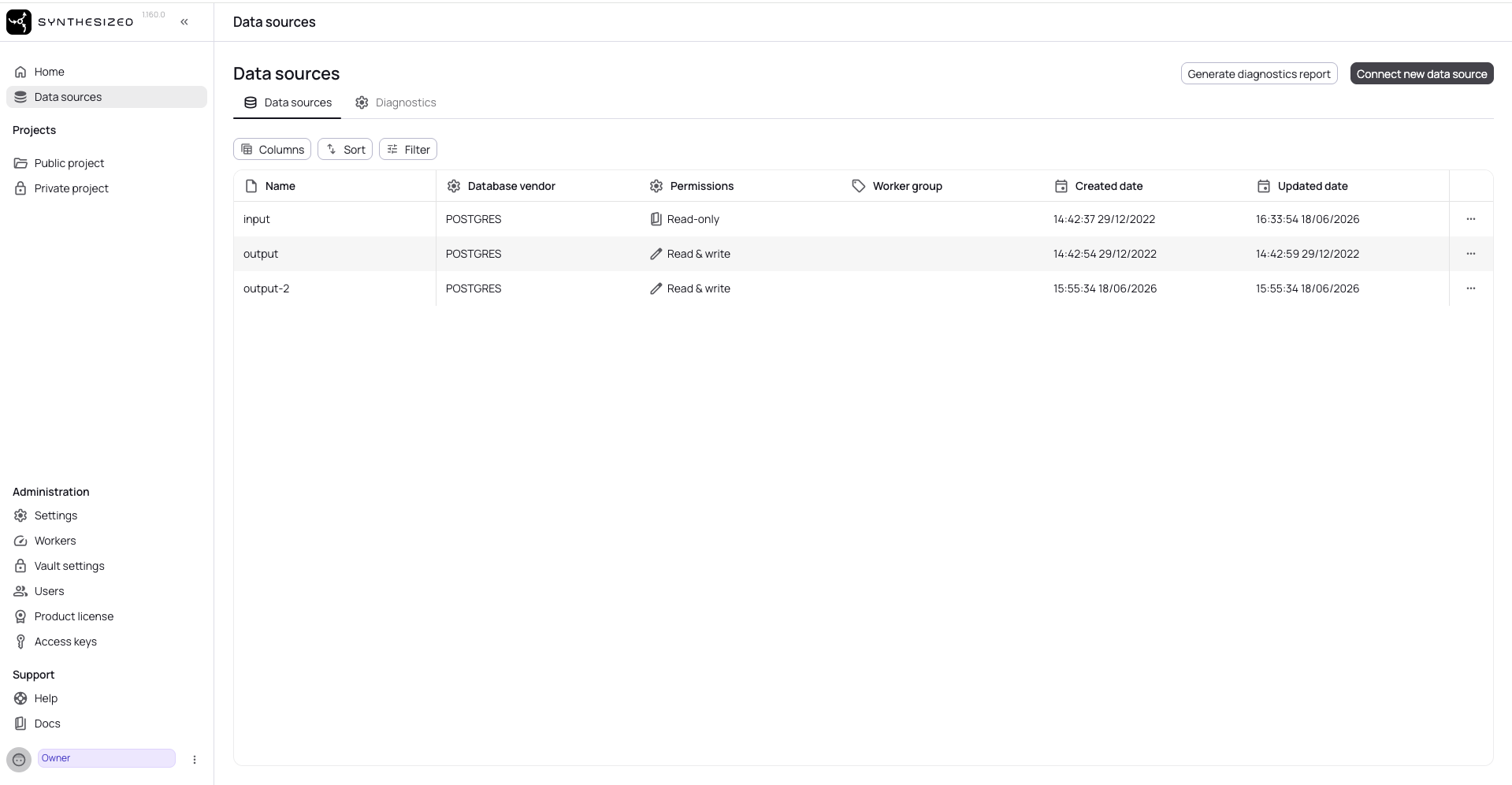
After starting the multi-worker stack, the Data sources page in Governor shows all three
connections — input, output, and output-2 — ready for use with no manual setup required:
Deployment Comparison
| Aspect | Docker Compose | Kubernetes (Helm) |
|---|---|---|
Environment variable prefix |
|
|
Datasource variable |
|
|
Scaling mechanism |
|
|
Port conflicts when scaling |
Resolved by overlay — resets the static host port binding |
No — ClusterIP handles routing |
Second output DB setup |
Automatic (demo overlay) |
Manual via Governor UI |