Azure DevOps Integration
Run Synthesized workflows from an Azure DevOps pipeline: mask production data, generate synthetic edge cases, then run your test suite — all as pipeline stages.
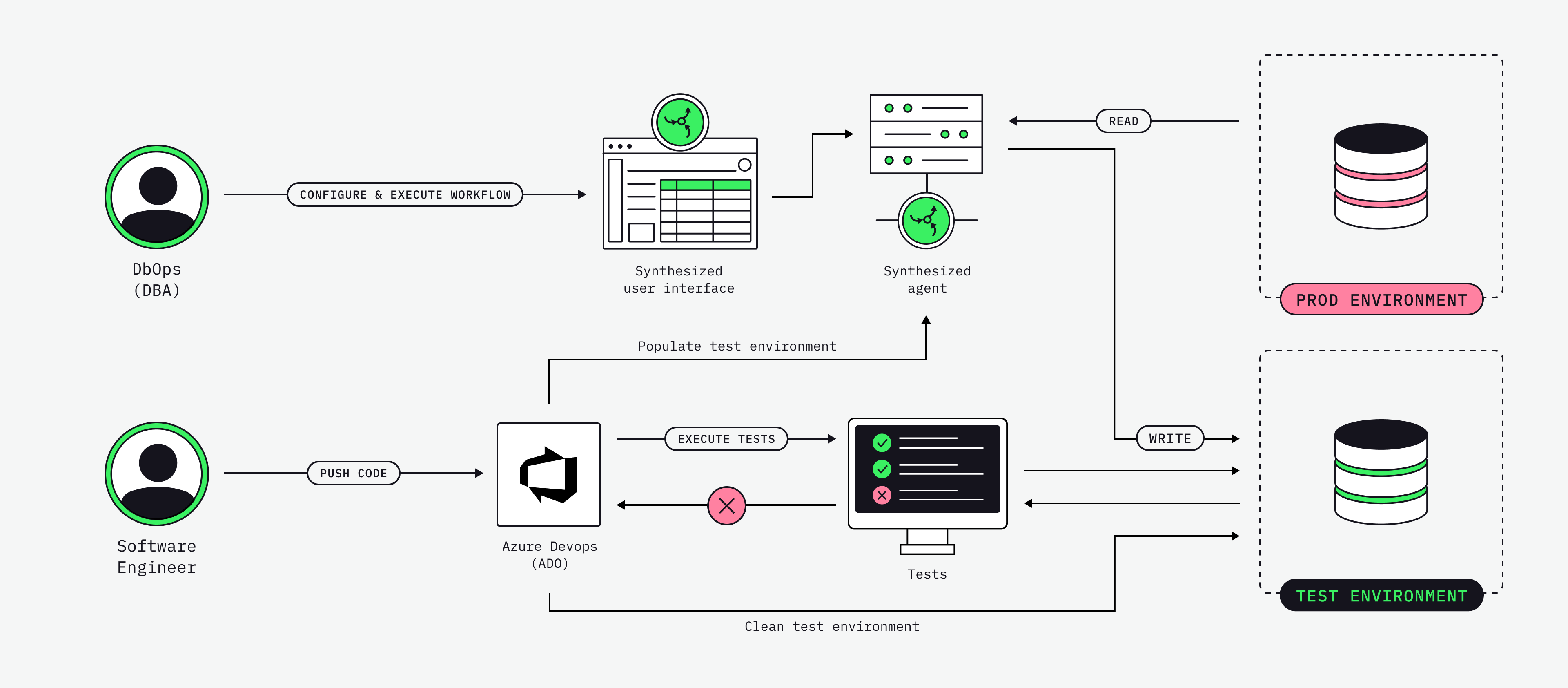
What this does
The pipeline triggers workflows you have already built in Governor. The worked example is the QA test-data flow, in three steps:
-
Mask a subset of production data into the test database.
-
Generate synthetic edge cases (nulls, boundary values, rare combinations) that production data rarely covers.
-
Run the QA suite against the freshly loaded test database.
Everything is triggered from Azure DevOps — no one logs into a database tool and no one copies a CSV by hand. Add a schedule and QA walks in each morning to a fresh test database.
How it works
The pipeline calls Governor’s external REST API. Each workflow step:
-
Authenticates with an access key in the
X-Access-Keyheader. -
Submits a run (
POST /workflow/{id}/run). -
Polls the run until it reaches a terminal status.
-
Tails the run logs if it fails.
The only custom code is one shell script (run-synthesized-workflow.sh) that does the submit-and-poll. The workflows themselves — masking rules, generation rules, source and target connections — live in Governor and are managed from the Governor UI.
Prerequisites
-
Two workflows defined in Governor. Build each one in the Governor UI, run it once to confirm it completes, and note its numeric workflow ID (visible in the URL, e.g.
/workflow/42). The example uses:mask-prod-to-testSource = production (read-only), target = test DB, masking rules for every PII column.
generate-syntheticTarget = test DB, synthetic generation rules for the edge cases your tests need.
-
An access key. In the Governor UI: Admin → Access Keys → Generate new key. The value looks like
<key>:<secret>and is shown only once. -
A variable group named
synthesized-tdkin Azure DevOps (see Secrets).
REST endpoints
All paths are under ${GOVERNOR_BASE_URL}/external/api/v1 and use the X-Access-Key: <key> header.
| Purpose | Method and path |
|---|---|
Health check |
|
Run a workflow |
|
Get run status |
|
Get run logs |
|
Stop a workflow |
|
Run statuses: COMPLETED, FAILED, STOPPED are terminal; QUEUED, RUNNING, STOPPING are in-flight.
|
|
The pipeline
Two stages: prepare the test data (two workflows), then run the QA suite. The schedule refreshes the data every weekday morning, and the skipMasking / skipGeneration parameters let you re-run just part of the flow.
# azure-pipelines.yml

trigger: none   # run on demand

schedules:
  # Refresh test data every weekday at 05:00 UTC.
  - cron: "0 5 * * 1-5"
    displayName: Nightly test-data refresh
    branches:
      include: [main]
    always: true            # run even with no source changes

parameters:
  - name: skipMasking
    displayName: Skip masking step (use existing test data)
    type: boolean
    default: false
  - name: skipGeneration
    displayName: Skip synthetic generation step
    type: boolean
    default: false

variables:
  - group: synthesized-tdk   # GOVERNOR_BASE_URL, X_ACCESS_KEY, workflow IDs

pool:
  vmImage: ubuntu-latest

stages:
  # -------- STAGE 1 — Prepare test data --------
  - stage: PrepareTestData
    displayName: "1. Prepare test data"
    jobs:

      - job: Preflight
        displayName: "Preflight: Governor reachable"
        steps:
          - bash: |
              set -euo pipefail
              which jq >/dev/null || sudo apt-get install -y jq
              curl -sS -f -H "X-Access-Key: ${X_ACCESS_KEY}" \
                "${GOVERNOR_BASE_URL%/}/external/api/v1/healthy"
              echo; echo "Governor is healthy."
            displayName: "Health check"
            env:
              GOVERNOR_BASE_URL: $(GOVERNOR_BASE_URL)
              X_ACCESS_KEY: $(X_ACCESS_KEY)

      - job: MaskProdToTest
        displayName: "Mask prod → test DB"
        dependsOn: Preflight
        condition: and(succeeded(), eq('${{ parameters.skipMasking }}', 'false'))
        steps:
          - template: templates/run-workflow-step.yml
            parameters:
              stepName: runMask
              displayName: "Run masking workflow"
              workflowId: $(MASK_WORKFLOW_ID)
              runLabel: "mask-prod-to-test"
              timeoutSec: "2400"   # 40 min — prod extract can be slow

      - job: GenerateSynthetic
        displayName: "Generate synthetic edge cases → test DB"
        dependsOn: MaskProdToTest
        condition: and(succeeded(), eq('${{ parameters.skipGeneration }}', 'false'))
        steps:
          - template: templates/run-workflow-step.yml
            parameters:
              stepName: runGenerate
              displayName: "Run generation workflow"
              workflowId: $(GENERATE_WORKFLOW_ID)
              runLabel: "generate-synthetic"
              timeoutSec: "1800"

  # -------- STAGE 2 — Run QA tests --------
  - stage: RunQATests
    displayName: "2. Run QA tests"
    dependsOn: PrepareTestData
    condition: succeeded()
    jobs:

      - job: IntegrationTests
        displayName: "Integration + regression suite"
        steps:
          - bash: |
              set -euo pipefail
              # Replace with your test runner, e.g.:
              #   mvn -B verify -Dspring.profiles.active=ci
              #   ./gradlew integrationTest
              #   pytest -q tests/integration
              echo "Run your test suite here."
            displayName: "Run tests"

          - task: PublishTestResults@2
            condition: succeededOrFailed()
            displayName: "Publish test results"
            inputs:
              testRunner: JUnit
              testResultsFiles: "**/TEST-*.xml"
              failTaskOnFailedTests: true
To run it per pull request instead of nightly, replace trigger: none with pr: [main] — nothing else changes. See In the Azure DevOps UI for how these stages and parameters appear when you run it.
Reusable step template
The submit-and-poll logic is wrapped in a step template, so running any workflow from any pipeline is a single template: reference. It passes the workflow ID and tuning values to the poller script as environment variables.
# templates/run-workflow-step.yml

parameters:
  - name: stepName
    type: string
  - name: displayName
    type: string
  - name: workflowId
    type: string
  - name: runLabel
    type: string
    default: ''
  - name: useWorkers
    type: string
    default: 'true'
  - name: timeoutSec
    type: string
    default: '1800'
  - name: pollIntervalSec
    type: string
    default: '10'

steps:
  - task: Bash@3
    name: ${{ parameters.stepName }}
    displayName: ${{ parameters.displayName }}
    env:
      GOVERNOR_BASE_URL: $(GOVERNOR_BASE_URL)
      X_ACCESS_KEY: $(X_ACCESS_KEY)     # secret variable — masked in logs
      WORKFLOW_ID: ${{ parameters.workflowId }}
      USE_WORKERS: ${{ parameters.useWorkers }}
      TIMEOUT_SEC: ${{ parameters.timeoutSec }}
      POLL_INTERVAL_SEC: ${{ parameters.pollIntervalSec }}
      RUN_LABEL: ${{ parameters.runLabel }}
    inputs:
      targetType: inline
      script: |
        bash "$(System.DefaultWorkingDirectory)/scripts/run-synthesized-workflow.sh"
The poller script
This is the only custom code. It submits a run, polls until the run reaches a terminal status, exposes the run ID to later steps, and tails the logs on failure. On timeout it tries to stop the workflow before failing the step.
#!/usr/bin/env bash
#
# run-synthesized-workflow.sh
# Triggers a Synthesized workflow via Governor's REST API and polls to completion.
#
# Required: GOVERNOR_BASE_URL, X_ACCESS_KEY, WORKFLOW_ID
# Optional: USE_WORKERS (true), POLL_INTERVAL_SEC (10), TIMEOUT_SEC (1800), RUN_LABEL
# Exit: 0 = COMPLETED, 1 = FAILED | STOPPED | timeout | API error
#
set -euo pipefail

: "${GOVERNOR_BASE_URL:?GOVERNOR_BASE_URL is required}"
: "${X_ACCESS_KEY:?X_ACCESS_KEY is required}"
: "${WORKFLOW_ID:?WORKFLOW_ID is required}"

USE_WORKERS="${USE_WORKERS:-true}"
POLL_INTERVAL_SEC="${POLL_INTERVAL_SEC:-10}"
TIMEOUT_SEC="${TIMEOUT_SEC:-1800}"
RUN_LABEL="${RUN_LABEL:-workflow-${WORKFLOW_ID}}"
BASE="${GOVERNOR_BASE_URL%/}/external/api/v1"

log() { echo "[$(date -u +%H:%M:%S)] $*"; }
err() { echo "##[error]$*"; }

# 1. Preflight
health_code=$(curl -sS -o /tmp/health.out -w "%{http_code}" \
  -H "X-Access-Key: ${X_ACCESS_KEY}" "${BASE}/healthy" || true)
if [[ "${health_code}" != "200" ]]; then
  err "Governor health check failed: HTTP ${health_code}"; cat /tmp/health.out || true; exit 1
fi
log "Health check OK"

# 2. Submit run
submit_url="${BASE}/workflow/${WORKFLOW_ID}/run?useWorkers=${USE_WORKERS}"
log "POST ${submit_url}"
submit_code=$(curl -sS -o /tmp/submit.json -w "%{http_code}" -X POST \
  -H "X-Access-Key: ${X_ACCESS_KEY}" -H "Accept: application/json" "${submit_url}" || true)
if [[ "${submit_code}" != "200" ]]; then
  err "Workflow submit failed: HTTP ${submit_code}"; cat /tmp/submit.json || true; exit 1
fi

run_id=$(jq -r '.workflow_run_id' /tmp/submit.json)
if [[ -z "${run_id}" || "${run_id}" == "null" ]]; then
  err "Could not parse workflow_run_id:"; cat /tmp/submit.json; exit 1
fi
log "Submitted. workflow_run_id=${run_id}"
echo "##vso[task.setvariable variable=synthesizedRunId;isOutput=true]${run_id}"

# 3. Poll
deadline=$(( $(date +%s) + TIMEOUT_SEC ))
last_status=""
while :; do
  if (( $(date +%s) > deadline )); then
    err "Timed out after ${TIMEOUT_SEC}s waiting for run ${run_id}"; break
  fi

  status_code=$(curl -sS -o /tmp/status.json -w "%{http_code}" \
    -H "X-Access-Key: ${X_ACCESS_KEY}" "${BASE}/workflow-run/${run_id}" || true)
  if [[ "${status_code}" != "200" ]]; then
    log "Transient poll error: HTTP ${status_code}. Retrying..."; sleep "${POLL_INTERVAL_SEC}"; continue
  fi

  status=$(jq -r '.workflow_run_status' /tmp/status.json)
  if [[ "${status}" != "${last_status}" ]]; then log "Status: ${status}"; last_status="${status}"; fi

  case "${status}" in
    COMPLETED)
      log "Run ${run_id} completed successfully"; exit 0 ;;
    FAILED|STOPPED)
      err "Run ${run_id} ended with status ${status}"
      jq -r '.error_message // "(no error_message)"' /tmp/status.json
      curl -sS -H "X-Access-Key: ${X_ACCESS_KEY}" \
        "${BASE}/workflow-run/${run_id}/logs?skip=0&limit=200" || true
      exit 1 ;;
    QUEUED|RUNNING|STOPPING)
      sleep "${POLL_INTERVAL_SEC}" ;;
    *)
      log "Unknown status '${status}', continuing to poll"; sleep "${POLL_INTERVAL_SEC}" ;;
  esac
done

# Timeout: stop the running workflow and fail the step.
curl -sS -o /dev/null -X POST \
  -H "X-Access-Key: ${X_ACCESS_KEY}" "${BASE}/workflow/${WORKFLOW_ID}/stop" || true
exit 1
Secrets
Create a variable group so secrets are injected by Azure DevOps and never live in the YAML. Go to Pipelines → Library → + Variable group, name it synthesized-tdk, and add:
| Name | Value | Secret? |
|---|---|---|
|
no |
|
|
the access key from Governor |
yes |
|
workflow ID for the masking flow |
no |
|
workflow ID for the generation flow |
no |
Marking X_ACCESS_KEY as secret ensures Azure DevOps masks it in pipeline logs.
|
Governor access keys are scoped. Create a key that can only run workflows tagged for QA, so the pipeline can never trigger a production-touching workflow. |
Setup checklist
-
Build and run the two workflows once in Governor; note their IDs.
-
Generate an access key (Admin → Access Keys).
-
Create the
synthesized-tdkvariable group with the values above. -
Push the repo (
azure-pipelines.yml,templates/,scripts/) to Azure Repos. -
Pipelines → New pipeline → Existing YAML and point it at
/azure-pipelines.yml. -
Run it once from the Run pipeline dialog, both skip options unchecked.
|
Microsoft-hosted agents need the free-tier parallelism grant approved for your organization. Request it early — approval can take a few business days. |
In the Azure DevOps UI
Once the variable group and pipeline exist, the whole flow runs from the Azure DevOps UI — no command line. Everything you see here comes straight from the YAML; this section maps one to the other.
Create the pipeline
Pipelines → New pipeline → Azure Repos Git, pick the repository, choose Existing Azure Pipelines YAML file, and point it at /azure-pipelines.yml. Azure DevOps reads the file and shows the pipeline; Save it.
Run it
Open the pipeline and click Run pipeline. The boolean parameters from the YAML render as checkboxes in the dialog — Skip masking step (use existing test data) and Skip synthetic generation step. For a full run, leave both unchecked, select the main branch, and click Run.
Watch the run
The run page shows the two stages from the YAML as a graph: 1. Prepare test data and 2. Run QA tests. Stage 1 expands into its jobs — Preflight, Mask prod → test DB, and Generate synthetic edge cases — each matching a job in the YAML and using its displayName. Click any job to stream its logs live.
In the masking job’s log you’ll see the health check, the POST, and the printed workflow_run_id, then Status: RUNNING advancing to Status: COMPLETED as the poller polls Governor.
Those log lines are the poller script running on the build agent, not in the browser — clicking Run pipeline queues the pipeline, the agent runs the Bash@3 step that calls run-synthesized-workflow.sh, and the UI streams its output. The script’s exit code is what turns the job green or red.
Correlate with Governor
Open the workflow’s run history in the Governor UI and find the run with the same ID the job printed. The pipeline isn’t doing anything magic — it’s just driving Governor’s REST API, and every run is visible and audited in Governor.
Re-run part of the flow
To reuse data that’s already masked, click Run pipeline again and tick Skip masking step. The masking job’s condition evaluates that parameter, the job is marked Skipped in the graph, and the run goes straight to generation and the QA tests.
|
The |
Troubleshooting
- A run failed — where do I look?
-
The script prints the run’s
error_messageand tails the last 200 log lines on failure. Theworkflow_run_idis logged on submission and set as thesynthesizedRunIdoutput variable, so you can match the pipeline run to the run in the Governor UI. - A workflow takes longer than the timeout.
-
Increase
timeoutSecon the step (it maps toTIMEOUT_SECin the script). - The pipeline hangs while polling.
-
Cancel it in Azure DevOps and re-run with
skipMasking=true(orskipGeneration=true) to skip the slow stage. On timeout the script also attempts to stop the running workflow. - How do I stop a pipeline running a production-touching workflow?
-
Scope the Governor access key so it can only run workflows tagged for QA, and lock the variable group to the appropriate environment.