Workflows and Runs
A workflow says what to do with each table of the input. This page explains how its configuration is structured, how every column gets a transformer, and what the engine does when the workflow runs.
What a workflow is
A workflow joins three things:
-
an input data source, which is read;
-
an output data source, where the result is written;
-
a YAML configuration, which says what to do with each table.
In Governor, a workflow belongs to a project, and can only use the data sources added to that project. You build it in the web UI, from a template or in the YAML editor, and saved changes are kept as versions, unless versioning is turned off for the workflow. You run it from the web UI or through the REST API. With the TDK CLI, the same configuration is a file you pass on the command line.
The configuration
A configuration has three levels:
| Level | What it sets |
|---|---|
Run-wide settings |
How the output is prepared and how the engine behaves: |
|
What happens to every table unless a table says otherwise: its |
|
Overrides for particular tables: a different mode or size, a |
For example, this configuration masks every table, keeps half the customers, keeps only recent rentals, copies country unchanged, and sets how three customer columns are masked:
default_config:
  mode: MASKING

tables:
  - table_name_with_schema: "public.customer"
    target_ratio: 0.5
    transformations:
      - columns: ["first_name", "last_name", "email"]
        params:
          type: person_generator
          column_templates: ["${first_name}", "${last_name}", "${email}"]
  - table_name_with_schema: "public.rental"
    filter: "rental_date >= '2022-07-01'"
  - table_name_with_schema: "public.country"
    mode: KEEP

schema_creation_mode: CREATE_IF_NOT_EXISTS
table_truncation_mode: TRUNCATE
safety_mode: STRICT
Every key is described in the Configuration Reference.
Modes
Each table has one mode, set in default_config or per table, so one workflow can mix them.
| Mode | What happens to the table | Output size |
|---|---|---|
|
Rows are copied as they are. |
The same, or smaller with |
|
Every column gets a masking transformer, unless you set another one. See How Masking Works. |
The same, or smaller with |
|
New rows are generated from what the engine learns from the input. See How Generation Works. |
Any: |
Making a table smaller is subsetting. It isn’t a separate mode: it works with KEEP and MASKING.
How each column gets a transformer
A transformer produces a column’s output values. For each column, the engine uses the first of these that applies:
-
A transformer you set for that column in
tables, undertransformations. You can also assign transformers to many columns at once withmatchers, by column name, SQL type or table name. -
A default rule. The engine has rules that pick a transformer from the column’s type and role. In
KEEPmode, columns are passed through unchanged. InMASKINGmode, for example, primary and foreign keys are hashed. You can add your own rules indefault_config, underadditional_items; they take precedence over the rules initems. -
The safety mode, when no rule matches:
-
STRICT, the default: the run fails, so no column passes through unmasked by accident. -
RELAXED: inMASKINGmode the column is copied unchanged (passthrough); inGENERATIONmode it gets anull_generatoror acategorical_generator. A column that holds the same value in every row gets a constant generator.
-
With safety_mode: RELAXED, columns that no rule matches are copied unmasked. Use it only when you have checked which columns those are.
|
The sensitive data scan can write the transformations for you: it finds the columns that hold personal data and suggests a transformer for each.
What a run does
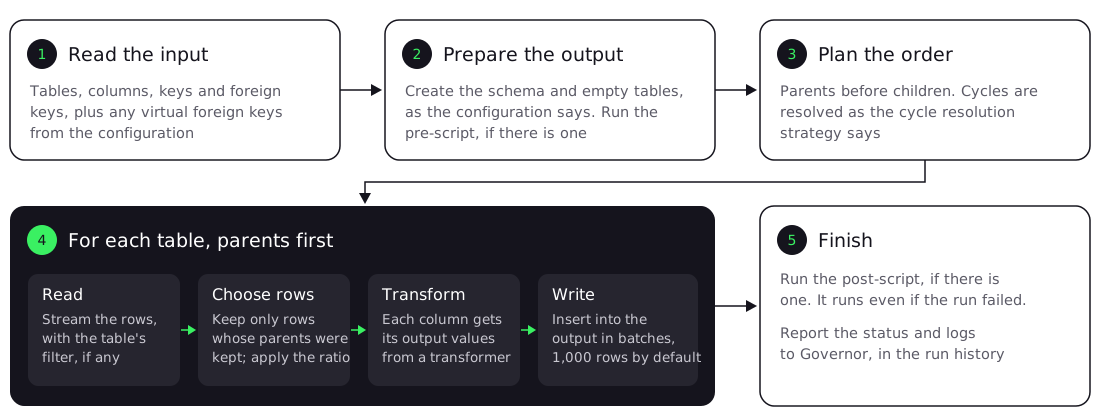
-
Read the input. The engine reads the schema: tables, columns, primary keys and foreign keys. Virtual foreign keys in the configuration are added to the ones in the database.
-
Prepare the output. It creates the output schema according to the schema creation mode, empties tables according to the table truncation mode, and runs the pre-script, if there is one.
-
Plan the order. Tables are processed parents first, so that every foreign key in the output can point to a row that’s already there. A foreign key cycle, such as an
employeestable that references itself, is resolved ascycle_resolution_strategysays. See Cycle resolution strategy. -
Process each table. The engine reads its rows, applying the table’s
filter; keeps only the rows whose parent rows were kept, and as many astarget_ratioasks for; gives each column its output values; and writes the rows to the output in batches ofinsert_batch_size, 1,000 by default. InGENERATIONmode, it generates new rows from what it learned about the input, instead of choosing input rows. -
Finish. It runs the post-script, if there is one; the post-script runs even when the run fails. Governor records the run’s status and logs in the run history. The CLI prints them.
Repeatable runs
global_seed seeds the random number generators. For generation, the reference states that the same seed and the same configuration give the same result each time. The default seed is empty; set your own base64-encoded value to get a different result.
Hashing transformers, such as unique_hashing, give the same output for the same input, which is how keys stay consistent across tables.
Where a run happens
In Governor, a run is a task that a worker takes. Worker groups decide which workers can take it; see Synthesized Workers. With the CLI, the run happens on the machine where you start it.
Related pages
-
Create a Workflow: build one in the web UI.